

The "A record" is a DNS record used for pointing a domain or a subdomain to an IP address.
You can add an A Record using the cPanel's Zone Editor option.
These are the steps to follow.
1. Log in to your cPanel Account.
2. In the Domains section, click on Zone Editor.

3. Under Domains, you can see many options below Actions.
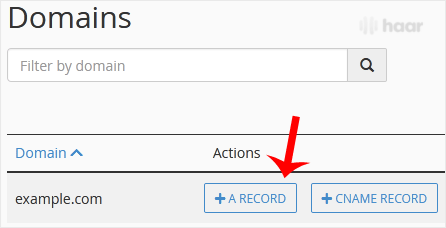
4. Click on A Record, and a pop-up box will open.
Enter the required details in it.
Name: Enter the name you want to add.
For example, enter blog and the cPanel will automatically add a domain name such as blog.example.com.
Address: Enter the IP Address of the server.
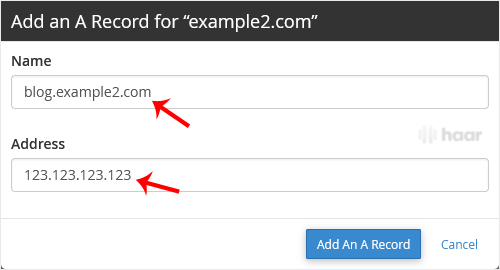
5. Now click on Add An A Record.
Congratulations! You have just added an A Record. The DNS propagation can take up to 24 hours.
Keep in mind: It may take anywhere from 12 to 24 hours for the changes to take effect worldwide.